
Deploy on Azure AKS
Run tenantplane on Azure Kubernetes Service.
This guide deploys tenantplane on an AKS cluster with Azure Disk storage and optional exposure through an Azure load balancer.
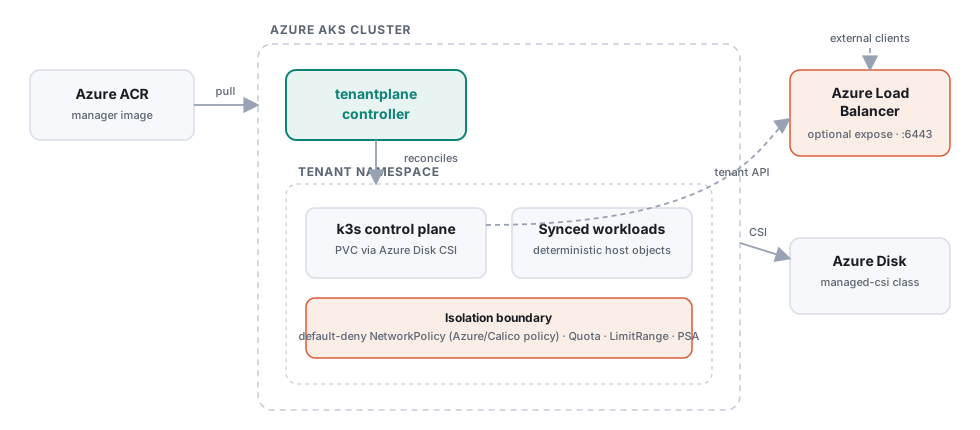
Prerequisites
azCLI authenticated, pluskubectlanddocker- An AKS cluster with a network policy engine enabled (required for the default-deny isolation to actually enforce — it must be chosen at creation):
az group create --name tenantplane-rg --location eastus
az aks create --resource-group tenantplane-rg --name tenantplane \
  --node-count 2 --node-vm-size Standard_D2s_v5 \
  --network-plugin azure --network-policy azure
az aks get-credentials --resource-group tenantplane-rg --name tenantplane
(--network-policy calico or the Cilium dataplane work too.)
1. Storage
AKS ships CSI-backed StorageClasses out of the box — no extra setup. The
managed-csi class (Azure Disk, LRS) is a good default for control planes:
kubectl get storageclass
2. Push the controller image to ACR
az acr create --resource-group tenantplane-rg --name tenantplaneacr --sku Basic
az acr login --name tenantplaneacr
# Let the cluster pull from the registry:
az aks update --resource-group tenantplane-rg --name tenantplane \
  --attach-acr tenantplaneacr

make docker-push IMG=tenantplaneacr.azurecr.io/tenantplane/manager:dev
3. Install tenantplane
kubectl apply -f config/crd
# Point the Deployment at your ACR image, then:
make deploy
kubectl -n tenantplane-system rollout status deploy/tenantplane-controller
4. Create a tenant with Azure Disk storage
spec:
  controlPlane:
    storage:
      className: managed-csi
      size: 2Gi
kubectl apply -f config/samples/isolationprofile_restricted.yaml
kubectl apply -f config/samples/syncpolicy_default.yaml
kubectl apply -f config/samples/tenantcluster_cloud.yaml
kubectl -n team-dev get tenantcluster cloud-dev -w
5. Optional: expose the tenant API via a load balancer
For an internal (VNet-only) load balancer:
spec:
  controlPlane:
    expose:
      loadBalancer: true
      annotations:
        service.beta.kubernetes.io/azure-load-balancer-internal: "true"
Omit the annotation for a public load balancer. Read the provisioned address from status:
kubectl -n team-dev get tenantcluster cloud-dev \
  -o jsonpath='{.status.externalEndpoint}{"\n"}'
Add that IP to spec.controlPlane.extraTLSSANs so the tenant API certificate
covers it (the control-plane pod restarts to pick up the new SAN), then point
your kubeconfig’s server: at the external endpoint.
Notes
- Azure Disk is
ReadWriteOnce, matching the single-replica control plane this milestone supports. - Pod Security: tenantplane enforces
baselineon tenant namespaces (withrestrictedaudit/warn) so the k3s control-plane pod is admitted — see the IsolationProfile docs.
Found a gap? Open an issue or PR.