
Deploy on AWS EKS
Run tenantplane on Amazon Elastic Kubernetes Service.
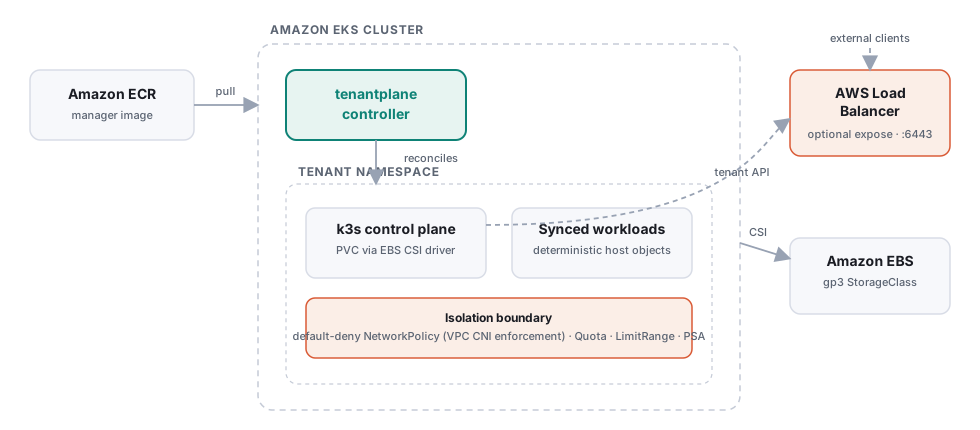
This guide deploys tenantplane on an EKS cluster and brings up a tenant backed by EBS storage, with optional exposure through an AWS load balancer.
Prerequisites
awsCLI authenticated, pluseksctl,kubectl,docker- An EKS cluster (1.27+ recommended):
eksctl create cluster --name tenantplane --region us-east-1 \
  --nodes 2 --node-type t3.large
1. Storage: install the EBS CSI driver
This is the most common failure point on EKS. Since Kubernetes 1.23, EKS does not provision EBS volumes without the EBS CSI driver add-on — the control-plane PVC would stay
Pendingforever.
eksctl utils associate-iam-oidc-provider --cluster tenantplane --approve
eksctl create iamserviceaccount \
  --name ebs-csi-controller-sa --namespace kube-system --cluster tenantplane \
  --role-name tenantplane-ebs-csi --role-only \
  --attach-policy-arn arn:aws:iam::aws:policy/service-role/AmazonEBSCSIDriverPolicy --approve
eksctl create addon --name aws-ebs-csi-driver --cluster tenantplane \
  --service-account-role-arn arn:aws:iam::<ACCOUNT_ID>:role/tenantplane-ebs-csi
Optionally create a gp3 StorageClass (cheaper and faster than the legacy gp2):
kubectl apply -f - <<'EOF'
apiVersion: storage.k8s.io/v1
kind: StorageClass
metadata:
  name: gp3
provisioner: ebs.csi.aws.com
volumeBindingMode: WaitForFirstConsumer
parameters:
  type: gp3
EOF
2. Network policy enforcement
The default-deny NetworkPolicy from the restricted isolation profile only
takes effect if a network policy engine is running. On EKS, enable the VPC CNI’s
built-in enforcement (VPC CNI v1.14+):
aws eks update-addon --cluster-name tenantplane --addon-name vpc-cni \
  --configuration-values '{"enableNetworkPolicy": "true"}'
(Calico or Cilium also work if you already run them.)
3. Push the controller image to ECR
aws ecr create-repository --repository-name tenantplane/manager
aws ecr get-login-password | docker login --username AWS \
  --password-stdin <ACCOUNT_ID>.dkr.ecr.us-east-1.amazonaws.com

make docker-push IMG=<ACCOUNT_ID>.dkr.ecr.us-east-1.amazonaws.com/tenantplane/manager:dev
4. Install tenantplane
kubectl apply -f config/crd
# Point the Deployment at your ECR image, then:
make deploy
kubectl -n tenantplane-system rollout status deploy/tenantplane-controller
5. Create a tenant with EBS storage
Use the cloud sample and set the storage class:
spec:
  controlPlane:
    storage:
      className: gp3
      size: 2Gi
kubectl apply -f config/samples/isolationprofile_restricted.yaml
kubectl apply -f config/samples/syncpolicy_default.yaml
kubectl apply -f config/samples/tenantcluster_cloud.yaml
kubectl -n team-dev get tenantcluster cloud-dev -w
6. Optional: expose the tenant API via a load balancer
spec:
  controlPlane:
    expose:
      loadBalancer: true
      annotations:
        service.beta.kubernetes.io/aws-load-balancer-scheme: internal
With the in-tree controller this provisions a classic ELB; if you run the AWS Load Balancer Controller, add its annotations for an NLB instead. Once provisioned, the address appears in status:
kubectl -n team-dev get tenantcluster cloud-dev \
  -o jsonpath='{.status.externalEndpoint}{"\n"}'
Then add that hostname to spec.controlPlane.extraTLSSANs so the tenant API
certificate covers it (the control-plane pod restarts to pick up the new SAN),
and point your kubeconfig’s server: at the external endpoint.
Notes
- The kubeconfig Secret targets the in-cluster Service FQDN by default; use the external endpoint flow above for access from outside the VPC.
- Pod Security: tenantplane enforces
baselineon tenant namespaces (withrestrictedaudit/warn) so the k3s control-plane pod is admitted — see the IsolationProfile docs.
Found a gap? Open an issue or PR.